

Build — Base Dashboard Skill for Claude
The shared foundation for read-only Torii dashboards across all Claude deployment surfaces
Purpose
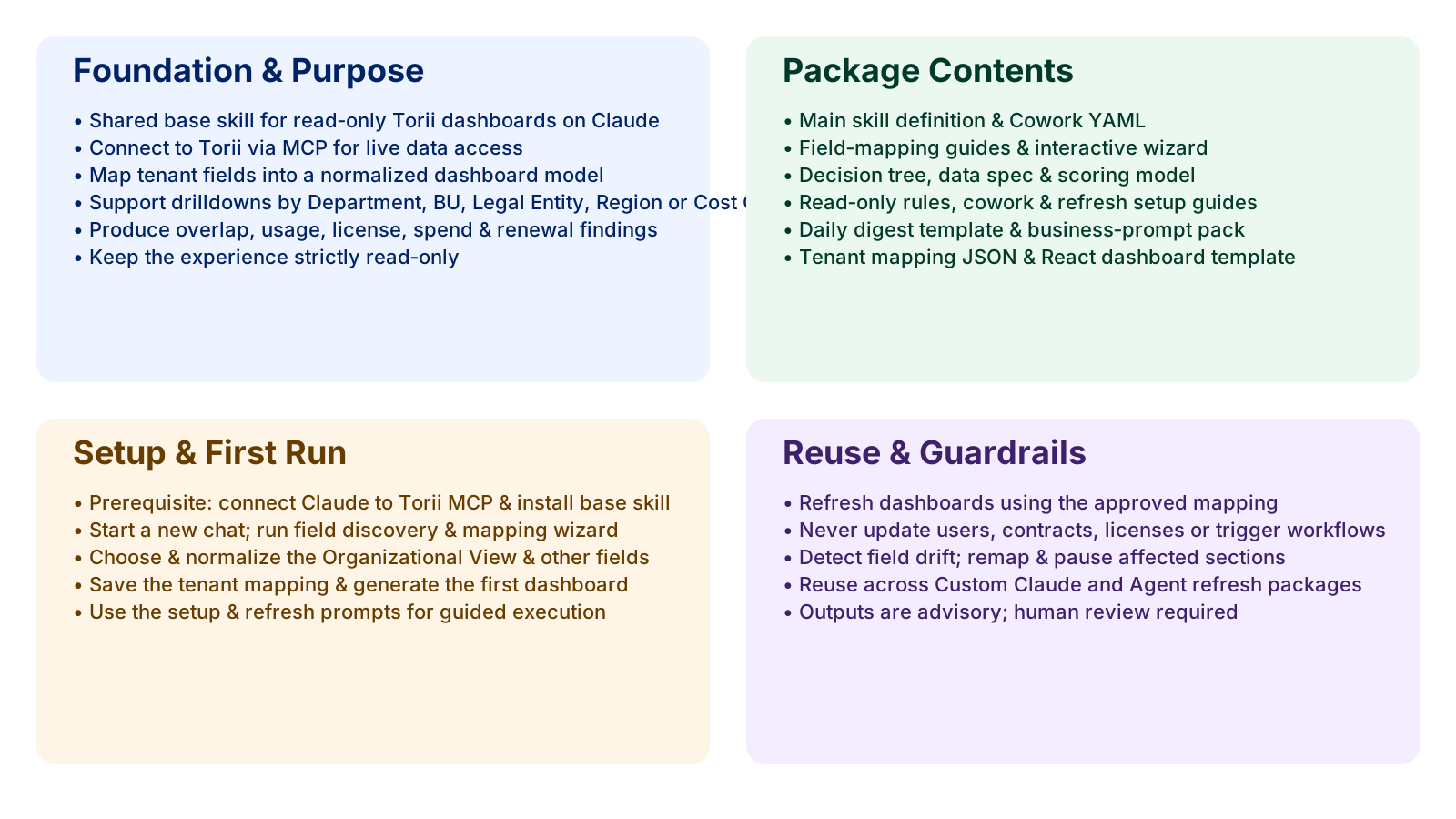
This package is the shared, reusable foundation for a read-only SaaS rationalization dashboard powered by Torii MCP. To get this package or any of the other skills packages, please contact your Torii Customer Success Manager.
Use it when you want one common dashboard layer that can:
- Read live Torii data via the Torii MCP on any connected Claude surface
- Map tenant-specific fields into a stable dashboard model
- Support drilldowns by Department, Business Unit, Legal Entity, Region, Cost Center, or another approved slice
- Produce overlap, usage, license, spend, and renewal findings
- Stay strictly read-only
The reference files, data spec, scoring model, and tenant mapping template in this package are platform-agnostic — they apply whether you are deploying via Claude.ai, Claude Desktop, Cowork, Claude Code, or the API. The Cowork-specific files (SKILL.md, claude.yaml, and react-dashboard-template.jsx) are clearly labeled as such.
This package is the base for the two Cowork-specific customer delivery packages:
customer-cowork-skill-package(Tier 2 — Cowork on-demand)customer-scheduled-skill-package(Tier 3 — Cowork scheduled refresh)
What this package contains
The package contains 14 files arranged like this:
saas-rationalization-dashboard/
├── SKILL.md
├── claude.yaml
├── references/
│   ├── tenant-field-mapping-guide.md
│   ├── business-user-field-mapping-wizard.md
│   ├── field-mapping-decision-tree.md
│   ├── dashboard-data-spec.md
│   ├── scoring-and-recommendation-model.md
│   ├── read-only-dashboard-rules.md
│   ├── cowork-skill-setup-guide.md
│   ├── scheduled-refresh-guide.md
│   ├── daily-refresh-digest-template.md
│   └── business-user-prompt-pack.md
└── assets/
    ├── tenant-mapping-template.json
    └── react-dashboard-template.jsx
What each file is for
SKILL.md (Cowork-specific)
SKILL.md (Cowork-specific)The main skill definition for the Cowork deployment surface. Defines:
- Skill name:
saas-rationalization-dashboard - Purpose and read-only operating rule
- Core workflow: field discovery → mapping → normalization → dashboard → scoring → findings → artifact
- Required terminology (Functional Domain, Functional Capability, Functional Capability Path, Organizational View)
- Notes on the live artifact and UUID configuration requirement
- Validation behavior (field drift, missing mappings)
On other surfaces, this file's role is fulfilled by: a Project's custom Instructions (claude.ai Projects), a CLAUDE.md file in the project directory (Claude Code), or a system prompt parameter in your API call. The content is the same — paste the workflow, read-only rules, and terminology from this file into whichever persistent context mechanism your surface supports.
claude.yaml (Cowork-specific)
claude.yaml (Cowork-specific)Skill display metadata for the Cowork environment — display name, description, icon, and brand color. This file is only used by the Cowork skill packaging system and has no equivalent on other surfaces.
references/tenant-field-mapping-guide.md
references/tenant-field-mapping-guide.mdHow to identify, discover, and approve the tenant-specific Torii fields the dashboard should use. Covers all mapping categories: Organizational View, functional grouping, app metadata, usage and engagement, license and financial, contract and renewal, security and governance.
references/business-user-field-mapping-wizard.md
references/business-user-field-mapping-wizard.mdThe interactive mapping flow for choosing the right source fields. Guides a business user through discovery, Organizational View selection, functional grouping, usage and financial confirmation, and saving the approved mapping.
references/field-mapping-decision-tree.md
references/field-mapping-decision-tree.mdResolves mapping choices when multiple possible fields exist. Covers Organizational View priority order, functional grouping fallback chain, owner mapping, financial mapping, and security mapping.
references/dashboard-data-spec.md
references/dashboard-data-spec.mdDefines the normalized dashboard schema that the skill produces: tenantMapping, groups, usageDrilldowns, portfolioSignals, contractSignals, decisionQueue. Also documents how the live Cowork artifact maps live MCP data into this schema at render time.
references/scoring-and-recommendation-model.md
references/scoring-and-recommendation-model.mdDefines how review candidates are scored and labeled. Seven score components, seven recommendation categories, and confidence score criteria. All outputs are advisory.
references/read-only-dashboard-rules.md
references/read-only-dashboard-rules.mdThe operating guardrails. Defines allowed and disallowed behavior. Includes the required language pattern: recommended review, decision queue, review finding — not execute action or trigger workflow.
references/cowork-skill-setup-guide.md
references/cowork-skill-setup-guide.mdHow to package the shared skill for the on-demand Tier 2 deployment. Covers first-run prompts, refresh prompts, artifact generation prompts, and business-user experience flow.
references/scheduled-refresh-guide.md
references/scheduled-refresh-guide.mdHow to package the shared skill for the Tier 3 scheduled refresh deployment. Covers Cowork scheduled task configuration, cadence options, and on-demand refresh between scheduled runs.
references/daily-refresh-digest-template.md
references/daily-refresh-digest-template.mdThe digest format for recurring refresh scenarios. Placeholder structure for refresh status, field mapping status, material changes, contract exposure, security signals, decision queue changes, and suggested review questions.
references/business-user-prompt-pack.md
references/business-user-prompt-pack.mdReusable prompts for business users covering setup, dashboard generation, live artifact generation, drilldowns, explanations, exports, and refresh.
assets/tenant-mapping-template.json
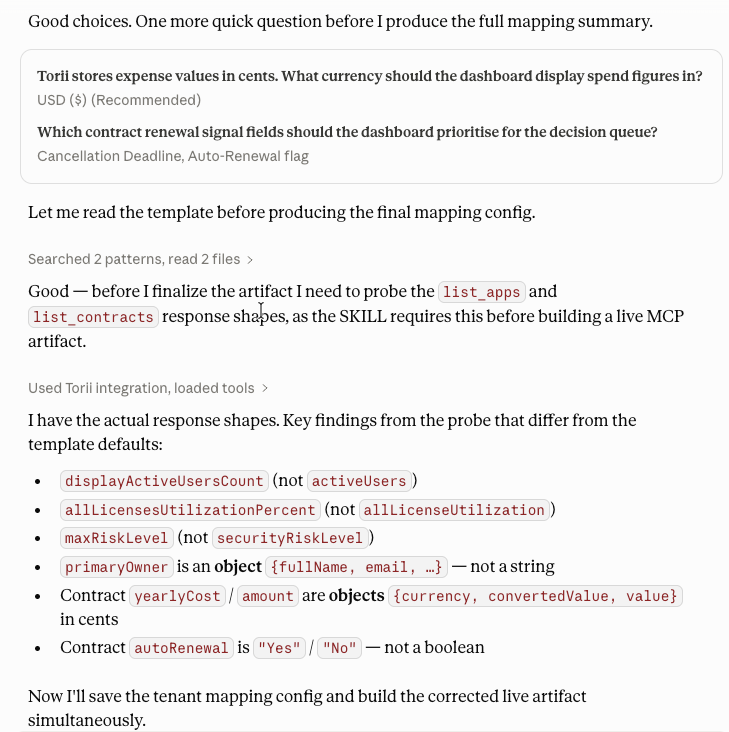
assets/tenant-mapping-template.jsonThe JSON structure for saving the approved tenant mapping. Includes the mcpUUID field and a note that expense fields are in cents. Populated once during the first-run mapping wizard and reused for all subsequent refreshes.
assets/react-dashboard-template.jsx (Cowork-specific)
assets/react-dashboard-template.jsx (Cowork-specific)The live-data React template for the Cowork interactive artifact. Uses window.cowork.callMcpTool to fetch live Torii data at render time. Includes Recharts visualizations (spend bar chart, license utilization pie chart), renewal exposure buckets, a filterable app portfolio table, and a read-only decision queue.
UUID configuration is required. Set MCP_UUID at the top of the file to your Torii MCP server UUID before deploying.
On other surfaces, dashboard visualization is delivered as conversational output, a saved HTML file, or a programmatically generated report rather than a Cowork sidebar artifact.
The Cowork live artifact vs. other surface outputs
The react-dashboard-template.jsx is the Cowork-specific output layer. It uses window.cowork.callMcpTool to pull live Torii data at render time. The equivalent output on other surfaces:
| Surface | Output format | Data freshness |
|---|---|---|
| Claude.ai web chat / Projects | Conversational text in chat | Generated at prompt time |
| Claude Desktop | Conversational text, optionally saved to file | Generated at prompt time |
| Cowork | Live React artifact in sidebar | Pulled from Torii MCP at each render |
| Claude Code | Saved markdown, HTML, or JSON file | Generated at run time |
| Claude API / Agent SDK | Any format, delivered programmatically | Generated at call time |
The design model — the six dashboard sections, scoring, decision queue, and Organizational View — is the same on every surface. Only the rendering layer differs.
The expense fields from list_apps (expenses, expensesLast30Days) are returned in cents on every surface. Divide by 100 for USD display. This is documented in assets/tenant-mapping-template.json.
Prerequisites
Before using this package, confirm:
- Claude is connected to Torii through MCP on your chosen surface (see the Connect article for surface-specific setup).
- The Torii MCP connection is working — validated with a test prompt.
- The connected Torii account has sufficient visibility for portfolio analysis.
- The deployment is explicitly intended to be read-only.
- Cowork only: The
saas-rationalization-dashboardskill package is installed and theSKILL.mdandclaude.yamlare in place. - Projects: The dashboard instructions from
SKILL.mdare pasted into the project's custom Instructions field. - Claude Code: A
CLAUDE.mdfile in the project directory contains the dashboard workflow and read-only rules. - API: The system prompt parameter in your API calls contains the dashboard instructions.
First-run flow
- Connect Claude to Torii MCP on your chosen surface.
- Set up persistent context: skill (Cowork), Project Instructions (claude.ai),
CLAUDE.md(Claude Code), or system prompt (API). - Validate the MCP connection with a test prompt.
- Run the first-use setup prompt.
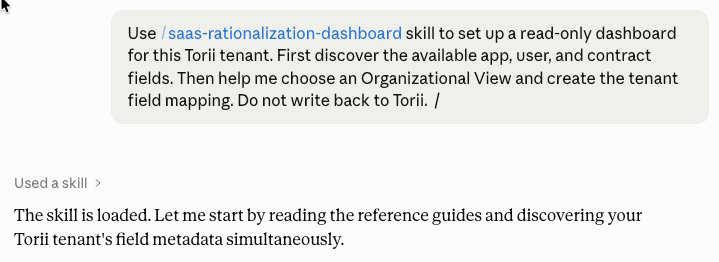
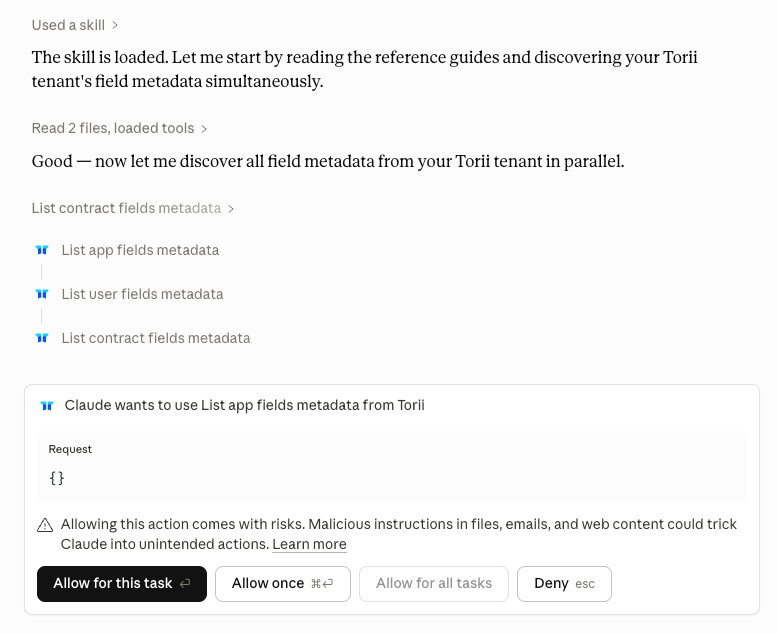
- Discover available Torii fields.
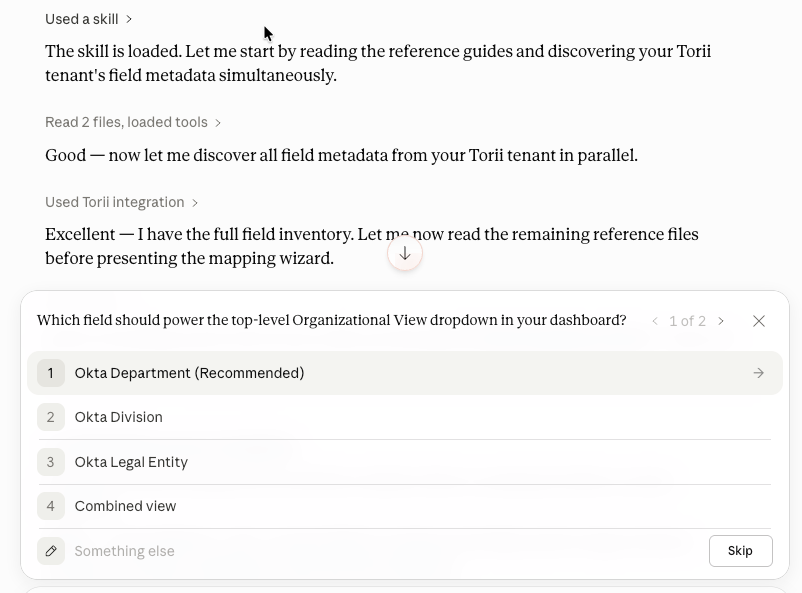
- Choose the Organizational View.
- Complete the mapping wizard.
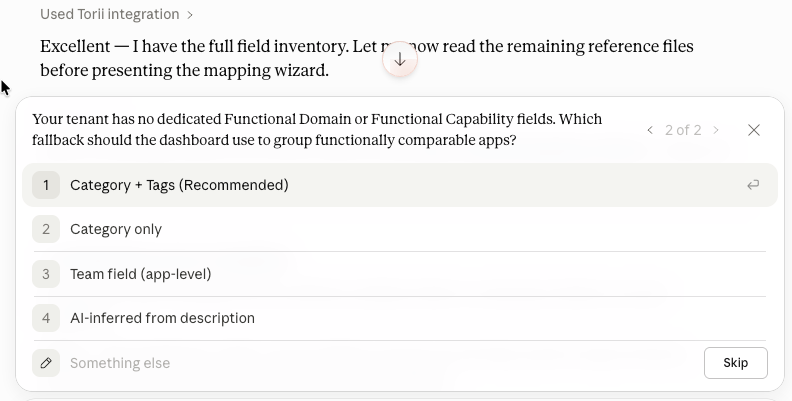
- Save the approved tenant mapping to
assets/tenant-mapping-template.json.
- Generate the first dashboard in your surface's output format.
- Validate the output.
- Cowork only: Optionally generate the live artifact and set
MCP_UUIDinreact-dashboard-template.jsx.
First-use setup prompt
Use the SaaS Rationalization Dashboard skill to set up a read-only dashboard for this
Torii tenant. First discover the available app, user, and contract fields. Then help me
choose an Organizational View and create the tenant field mapping. Do not write back to Torii.
Refresh prompt
Refresh the read-only SaaS rationalization dashboard using the approved tenant mapping.
Highlight any changes in usage, licenses, spend, renewal exposure, or overlap findings.
Flag any field drift or missing data.
Live artifact prompt
Generate the SaaS rationalization dashboard as a live interactive Cowork artifact using
the approved tenant mapping. Pull live data from the connected Torii MCP.
Repeat-run flow
After setup is complete, the normal usage sequence is:
- Open a Cowork session with the Torii MCP connected.
- Invoke the skill.
- Reference the approved tenant mapping.
- Refresh the dashboard.
- Review findings.
- Ask follow-up questions using the prompt pack.
- Reopen the live artifact for updated data.
What the package must never do
Even if the Torii MCP exposes action capabilities in your environment, this package must never be used to:
- Update a user
- Create a contract
- Run a workflow
- Assign or remove a license
- Change ownership
- Perform automated remediation
All outputs are advisory. Actions must be taken manually by the relevant stakeholders.
Troubleshooting
The skill runs but the dashboard uses the wrong grouping. Re-run the mapping flow and confirm the approved Organizational View is being reused.
The skill asks for remapping on every run. The tenant mapping was never saved in a reusable way, or the source field is drifting. Save the mapping using assets/tenant-mapping-template.json and reference it explicitly in refresh prompts.
The live artifact shows a configuration error. The MCP_UUID placeholder has not been replaced. Open the artifact source and set it to your actual Torii MCP server UUID.
The live artifact loads but spend sections are empty. Verify that expense fields are populated in the Torii tenant and that the connected account has access to financial data.
The skill offers write-back actions. Torii MCP may expose action capabilities. Keep prompts explicitly read-only and decline any write-back suggestions.
Final checklist
- Claude connected to Torii MCP on chosen surface
- Persistent context configured (skill / Project Instructions / CLAUDE.md / system prompt)
- MCP connection validated with test prompts
- First-use setup prompt executed
- Organizational View approved
- Tenant mapping saved to
assets/tenant-mapping-template.json - First dashboard generated and validated
- Output format matches the deployment surface
- Cowork only:
MCP_UUIDset inreact-dashboard-template.jsx - Business users have
references/business-user-prompt-pack.md - Read-only behaviour confirmed throughout
Updated 6 months ago