

Choose - Plain ChatGPT, Custom GPT Wrapper or Agent Wrapper
Package the experience based on your use case - this guide helps you choose
Purpose
This guide helps you choose how to deliver the dashboard experience once ChatGPT is connected to Torii through MCP.
The core pattern stays the same in all cases:
- ChatGPT connects to Torii through the MCP connector
- The assistant uses Torii data for analysis
- The experience is constrained to read-only dashboard behavior
- Users can drill down by an approved Organizational View such as Department, Business Unit, Legal Entity, Region, or Cost Center
What changes based on your use case and desired workflow is how the solution is packaged.
The deployment principle
Start with the simplest option that delivers the outcome.
Because Torii already provides a remote MCP endpoint for ChatGPT, the default deployment path should usually be:
Plain ChatGPT + Torii MCP connector
That path is grounded in Torii’s official MCP article, which documents the ChatGPT connector flow, the MCP server URL, and OAuth-based connection setup.
Use wrappers only when they add clear value.
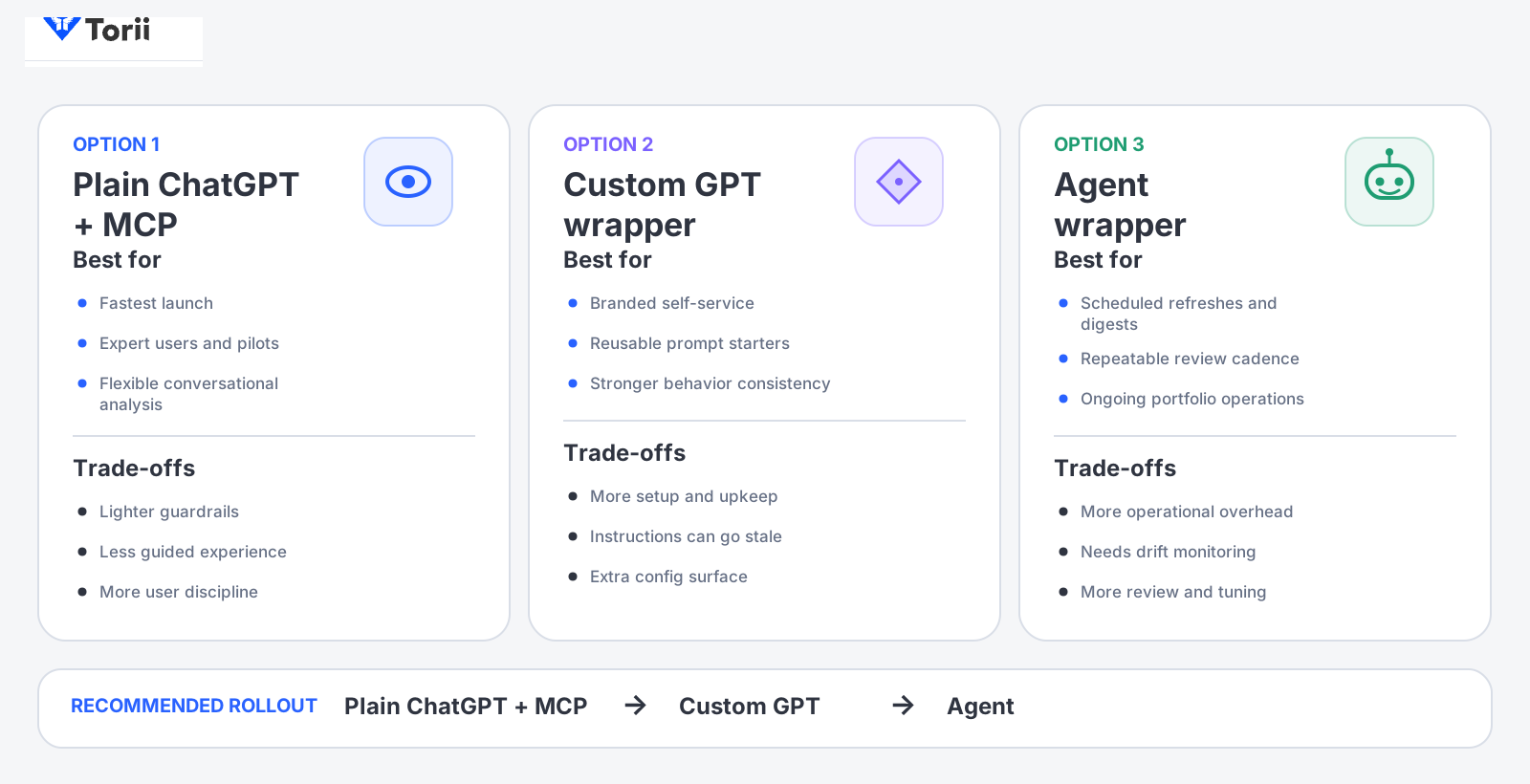
The three deployment options
There are three practical ways to package this dashboard experience:
- Plain ChatGPT + Torii MCP
- Custom GPT wrapper
- Agent wrapper
Each uses the same underlying Torii MCP connection. The difference is how much instruction, control, and repeatability you want to add.
Option 1: Plain ChatGPT + Torii MCP
What it is
This is the direct setup:
- Add Torii as a connector in ChatGPT
- Authenticate with OAuth
- Enable the Torii connector in a chat
- Use prompts and lightweight instructions to operate as a read-only dashboard assistant
Torii documents that ChatGPT supports remote MCP servers through Connectors and that the Torii MCP server URL is https://api.toriihq.com/mcp. Torii also documents that ChatGPT uses OAuth for this connection flow.
When to use it
Choose plain ChatGPT when you want:
- The fastest time to value
- The least setup overhead
- A flexible analyst experience
- Interactive natural-language exploration
- A human-in-the-loop dashboard workflow
This is usually the best starting point for pilots and early production use.
Benefits
Plain ChatGPT gives you:
- The shortest setup path
- The fewest moving parts
- Low maintenance overhead
- Fast iteration on prompts and dashboard questions
- Easy stakeholder demos
Tradeoffs
Plain ChatGPT also means:
- Less rigid prompt control
- Less branded or guided user experience
- More reliance on user discipline
- Fewer built-in guardrails unless you document and enforce them operationally
Best fit
Plain ChatGPT is usually best for:
- Internal IT or SaaS teams
- Power users
- Solution validation
- Early-stage rollouts
- Environments where a guided wrapper is not yet necessary
Recommended use pattern
Use plain ChatGPT when your team can standardize around:
- One approved Organizational View
- A read-only prompt pattern
- A small set of reusable dashboard prompts
- A lightweight review process for drift or misclassification
Option 2: Custom GPT wrapper
What it is
A Custom GPT wrapper adds a curated instruction layer on top of the same Torii MCP-connected experience.
The wrapper does not replace MCP. It packages the experience so users enter a more controlled, more repeatable dashboard assistant.
A good Custom GPT wrapper typically includes:
- A fixed name and purpose
- Persistent behavior instructions
- Read-only constraints
- A standard dashboard vocabulary
- Reusable prompt starters
- Clearer guidance for non-technical users
When to use it
Choose a Custom GPT wrapper when you want:
- A branded internal experience
- Stronger behavior consistency
- Reusable onboarding instructions
- Fixed prompt starters
- Fewer chances for users to drift into unsupported requests
Benefits
A Custom GPT wrapper gives you:
- More predictable behavior
- Better user onboarding
- Easier reuse across internal teams
- Clearer enforcement of read-only rules
- Cleaner vocabulary around Functional Domain, Functional Capability, Functional Capability Path, and Organizational View
Tradeoffs
A Custom GPT wrapper adds:
- More setup work than plain ChatGPT
- Another configuration surface to maintain
- Periodic review of instructions and prompt starters
- Risk of stale instructions if your mapping or dashboard model changes
Best fit
A Custom GPT wrapper is usually best for:
- Broader internal business audiences
- Self-service stakeholders
- Repeatable dashboard experiences
- Organizations that want a named internal dashboard assistant
- Teams that need light governance without building a full operational agent
Recommended wrapper behavior
A Custom GPT wrapper should be instructed to:
- Use Torii MCP for data access
- Stay in read-only mode
- Use the approved Organizational View
- Ask clarifying questions when the user asks for an unsupported slice
- Explain recommendations instead of taking actions
- Pause affected sections when field drift or poor data quality is detected
Example positioning
A good internal name might be:
- SaaS Rationalization Dashboard
- Torii Portfolio Review Assistant
- Software Usage and Spend Dashboard
Option 3: Agent wrapper
What it is
An Agent wrapper takes the same MCP-connected dashboard logic and adds recurring execution behavior.
This is the right packaging when you want the dashboard to refresh or summarize on a regular cadence instead of only when a user asks.
Depending on the host capabilities available in your environment, an Agent wrapper can support things like:
- Recurring refreshes
- Digest-style summaries
- Repeatable review queues
- Scheduled portfolio check-ins
When to use it
Choose an Agent wrapper when you want:
- A repeatable refresh process
- A daily or weekly review cadence
- Stakeholder digests
- A standing review workflow for SaaS rationalization
Benefits
An Agent wrapper gives you:
- More operational consistency
- Less manual re-prompting
- Better continuity for recurring reviews
- A natural fit for leadership updates or recurring portfolio triage
Tradeoffs
An Agent wrapper also introduces:
- More operational overhead
- More need for careful guardrails
- More need for drift detection and escalation behavior
- More review of prompts, schedules, and outputs
Best fit
An Agent wrapper is usually best for:
- Mature internal programs
- Ongoing SaaS review motions
- Recurring contract and renewal monitoring
- Environments with a formal review cadence
- Teams that want digests rather than only interactive analysis
Important caution
The more automated the packaging becomes, the more important it is to keep the dashboard read-only.
Torii’s MCP support article explicitly says the connected assistant can take actions the user has granted, such as updating a user or creating a contract. For this dashboard pattern, those actions should remain out of scope.
Comparison by decision criteria
Choose Plain ChatGPT + MCP when
- You want the fastest launch
- You have a small expert user group
- The experience can remain conversational
- You do not need strong branding or scheduling yet
Choose a Custom GPT wrapper when
- You want stronger consistency
- You want a named internal dashboard assistant
- You want reusable prompt starters and instructions
- You want to reduce prompt drift for business users
Choose an Agent wrapper when
- You need recurring refreshes
- You want scheduled summaries
- You want a durable review cadence
- You are ready to operate and monitor a more structured experience
Recommended rollout sequence
For most organizations, the best rollout order is:
- Plain ChatGPT + MCP
- Custom GPT wrapper
- Agent wrapper
That order keeps the deployment grounded in the simplest working pattern first.
Why this sequence works
Start with plain ChatGPT because:
- Torii’s official MCP connector path already supports the core interaction model in ChatGPT.
- You can validate the dashboard value before investing in packaging
- You can confirm the right Organizational View and prompt patterns first
Move to a Custom GPT when:
- Your prompts stabilize
- Users want a cleaner self-service experience
- You need stronger guardrails
Move to an Agent only when:
- The review process becomes recurring
- Stakeholders want scheduled summaries
- The operating team can support drift monitoring and output review
How the uploaded packages fit
If you already have package assets for:
- A shared read-only skill or dashboard definition
- A Custom GPT wrapper
- An Agent wrapper
Treat them as accelerators, not as the primary architecture.
The primary architecture remains:
ChatGPT + Torii MCP + read-only dashboard rules
The wrappers sit on top of that foundation.
Recommended package responsibilities
Plain ChatGPT package responsibilities
Keep these outside formal packaging as much as possible:
- Connector setup
- Approved Organizational View
- Approved prompt pack
- Read-only rules
- Review checklist
Custom GPT wrapper responsibilities
Use the wrapper to standardize:
- Name and description
- Behaviour instructions
- Allowed and disallowed actions
- Dashboard vocabulary
- Approved drill down field
- Prompt starters
- Confidence and drift language
Agent wrapper responsibilities
Use the wrapper to standardize:
- Refresh cadence
- Digest format
- Escalation behavior
- Drift handling
- Review queue format
- Read-only operating rules
Guardrails for every packaging option
No matter which packaging model you choose, keep these rules constant:
- Torii MCP is the runtime data access layer
- The experience is read-only
- One approved Organizational View is used at a time
- Recommendations are advisory
- Unmapped or poor-quality data is disclosed
- Field drift pauses affected sections instead of triggering guesswork
Suggested decision language for stakeholders
Use language like:
We are starting with plain ChatGPT plus Torii MCP because it is the fastest supported path.We will add a Custom GPT wrapper once the dashboard prompts and drilldowns stabilize.We will only move to an Agent wrapper when the review process becomes recurring and operationally owned.
Avoid language like:
We need a wrapper before we can use Torii MCP.The agent will manage software decisions automatically.The dashboard will take actions in Torii for us.
Common packaging mistakes
Avoid these:
- Starting with an Agent before the dashboard logic is stable
- Packaging before the Organizational View is approved
- Allowing write actions because MCP technically supports them
- Mixing multiple business slices without making the active slice clear
- Assuming wrappers fix bad field quality or bad mappings
Updated 6 months ago